



1- An Intro Straight to the point: Why Procreate Dreams is the best (potential) new way to animate?
The long-awaited software of the Procreate family, Procreate Dreams, whose release date is today 22 November 2023, also marks the opening of a new portal to a world of 2D animation of the highest quality, allowing artists who want to express themselves through this incredible art with the best possible approach, thanks to a powerful creation tool that is within everyone’s reach.
This Procreate Dreams Review in short, does confirm the expectations we all had: as with its big brother Procreate, it is a software truly capable of changing in the next years the way animated art is created and the comfort with which animators will be able to work on the highest quality cinematic content. But let’s now see why…
2- Procreate’s approach to software: mobile is better, actually fundamental.
Procreate Dreams is the first example of such an advanced 2D animation suite on iPad. Sure, scrolling through the App Store, we can come across several competitors at a glance, but none of them contain within them, every single tool needed for a complete animation pipeline.
Any artist will already be familiar with Procreate’s approach to software and user experience. In this sense, Dreams, follows the path already defined by its big brother: the interface, in fact, has been designed to be managed entirely with just the use of the Apple Pencil and your fingers, thus guaranteeing the least number of devices required, but without sacrificing expressive power.

1-Portability first: making the most of Apple’s hardware architecture
When a software is native to the Apple ecosystem, the difference is immediate, regardless of how you feel about the age-old question of which computer company is the best.
Procreate Dreams is a very clear example of this.
Generally when we have professional needs, the number of devices and computing power required to perform such work is extremely high. A 2D artists’ workstation many times meant, buying a digital tablet, an expensive screen with a wide colour space and a computer with a dedicated video card and state-of-the-art hardware. All this, of course, putting aside the possibility of being able to move around easily, while continuing our artistic tasks.
This was probably the issue on which the Procreate team designed the entire architecture and UI of Procreate.
The software was designed in such an optimised way that it can be operated using only a tablet, a pen… and one’s fingers.
The entire user experience for Procreate Dreams is so minimalist and well thought-out that there is a risk, for those not already familiar with its big brother, of not only failing to understand how to perform simple actions at first glance, but also of failing to see the immense amount of tools hidden within.

This feeling, however, will only last for a few minutes, only until one learns the range of gestures, which will quickly become natural and almost instinctive (undo and redo by the touch of two or three fingers is a perfect as well as brilliant example).
This synthesis of commands, not only for navigation but also for the execution of operations, and an interface that seems to have always enough space regardless of the small size of the devices for which Procreate Dreams was created, makes it possible to work autonomously from any location, without feeling limited.
These are the features that determine its major innovation in the animation field in the first place.
2-An interface that is sometimes a little too minimalist, but that is not a flaw.
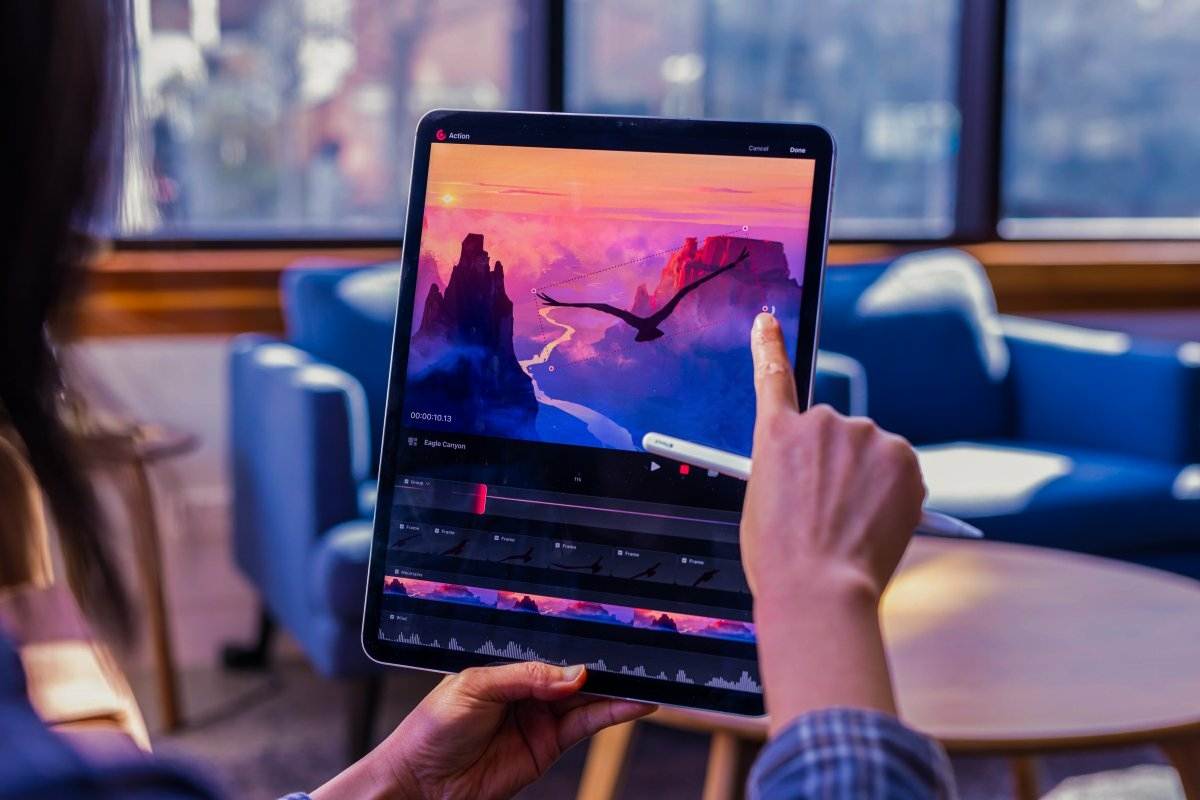
The benefit of such a minimalist interface is at first glance a little difficult to notice, as one might think that many control elements are missing. Procreate Dreams, however, is an example of optimization taken to the highest level, where everything you need in the interface is essentially divided into three simple sections: the Theater, the Stage and the Timeline.

The Theater is the first section we will find when we open the programme. In it we can choose the type of video we are going to create, of which we can already set both the size, being able to opt here for a typical cinematic ratio or for one already optimised for the latest social needs, and the number of FPS, as well as the total length (in minutes) of the video.
The Stage, the second part, is the creative soul, which we find in the upper section of the screen. It is a kind of ‘mini-canvas’, similar in structure, layout and options to the typical Procreate workspace. In this sense, native Procreate artists will love this solution as it will be similar, albeit simplified, to an interface they are familiar with as it is the simplified version of traditional Procreate. It will be used to draw every single layer that we animate.

The brushes and in general the tools in this section are similar to what we already find in Procreate, but have the important purpose of serving the animation, in lines, backgrounds, shadows and effects. For this reason, they will be more simplified in customisation, but no less powerful (note that your favourite brushes from Procreate can be imported without any problems). The layer structure of the original software also remains unchanged, as do the blending methods, but the real novelty is its ability to be worked in conjunction with the power of the Timeline.
Finally, the aforementioned Timeline is the lower part of the interface, where the real animation magic happens. Here the wizards of procreate have performed a veritable spell, simplifying a section that in many other animation software would be complex and difficult to learn, into a series of options masterfully grouped in a handy little button called ‘Playhead‘.

All this is then topped off with an extremely fluid navigation where zooms, changes, filters, cuts take place without slowing down. Here every animator can manage the technical details of the animated creation: from the composition of the keyframes to the time management of the animation tracks.
These in particular differ from the levels in the ‘Stage‘ section in that they are similar in layout to video management software. Each track in fact, can contain within it, drawings, movies, audio and effects, which are superimposed on each other. Each track can therefore be animated and managed individually, as it can also contain within it several painting layers, which can be animated individually.

3-Every action, a gesture.
Want to know something really interesting? Procreate Dreams is designed to offer a range of control gestures that profoundly optimises the workflow. The gestures are divided into generic combinations, also common to the user interface of the first Procreate, and specific combinations, designed to control the Timeline and everything related to the animation workflow.
For example, you only need to tap with two fingers on the canvas to undo while drawing, or use three fingers to move forward. You can use a two-finger pinch to control the zoom of the canvas area and a quick pinch to perform a quick fit to screen.
To scale the size of the timeline and control the keyframes of your film in their entirety, simply move three fingers up or slide them left and right to control the length of the visible timeline.
No buttons, all interface space gained.
3- What makes Procreate Dreams so good?
1-Instant Payback speed and low loading thanks to Apple’s Metal
The new hardware architecture of apple products, which has been based on proprietary chips for a few years now, is the ideal terrain, given the increasing demands in terms of both size and power, to guarantee the stability of powerful and complex software such as Procreate.
The speed, responsiveness and graphic power required by an animation application like Dreams also needed the hardware and software of the device itself to be mature enough to allow it.
A simple but fundamental feature, such as the Onion Skin, which we will see in more detail in a few lines, would not be possible if not for the numerous dedicated graphics cores of the new models linked to the M1 and M2 chips, as well as Apple Metal, the GPU management framework developed by Apple specifically for its devices.
In this sense, Procreate makes the most of it, combining the power of a desktop software with the flexibility and speed of a mobile app.

2- The settings bar, a micro hub that changes Procreate’s functions instantly.
Consisting of five buttons that contain a range of options that allow you to manage the entire interface, the Settings bar allows you to quickly access the main sections of the software. Here, it is possible to return to the ‘Theatre‘ view, manage project properties (by clicking on the project name), view animations in real time, use the performance mode to capture our animations in real time (you can learn more about this below), edit the timeline, switch to the ‘Draw&Paint’ mode, as well as add multimedia files of various kinds to the project currently under development.

3- Old school animation management with a touch of technology: the onion skin and keyframe interpolation
In order to allow animators to work according to traditional golden age animation methods, Procreate Dreams has also provided for the introduction of Onion Skins, essentially a pre- and post-frame view, with variable opacity, colour and number of visible frames, which allows animators to keep an eye on the fluidity of the various animation poses, between keyframes.

In addition to this important dedicated tool, Dreams has also provided for the integration of tools to interpolate frames automatically, accessible directly on the individual Tracks, thanks to the options enclosed in the Playhead.
Interpolation, a technique widely used by existing 2D and 3D animation software, simplifies the animator’s life: in the creation of interpolated movements and scaling, in addition to the initial and final frames, the rest of the intermediate positions between the keyframes are defined by ‘filling’ automatically, by the programme itself.
4- Our drawing board, which is already so familiar: Procreate’s brushes at the service of animation.
As previously mentioned, Procreate Dreams provides full compatibility with Procreate brushes. This will allow you to animate using tools that are already an active part of your everyday life. However, the customisation options, for reasons of practicality and limiting self-competition, are more restricted than those of Procreate.
Using the split screen view, however, you can import your favourite brush directly, via drag and drop, from one software to the other.

5- Thanks to Flipbook, we go back to being animators traditional animator (sort of)
Another important gem among the tools Procreate Dreams offers its animators is the Flipbook, a sort of mini tool for moving quickly between frames. Remember when in the traditional animation videos, they used to see the animator quickly shaking, almost like a magician, the pages he had drawn up to that moment, so that he always had an overview of his animation? Here The flip book is nothing other than the digital transposition of this working method. We have tried it and the result is exactly analogous, albeit digitally, to that feeling, allowing us to work even without the timeline, and thus filling the entire interface with the drawing area.

6- An additional ace up our sleeve: the ‘Performing’ mode
The ‘Performing‘ mode also allows us to record keyframes in real time, using our finger gestures to animate! It can be activated, as mentioned above from the settings bar, by using the little ‘REC’ button: once this is triggered, everything you move while the animation is playing back will be recorded as a series of keyframes on the currently active track. This will greatly reduce animation time, at the expense of accuracy. In Performing mode it is possible to record not only, animation-related movements, but also filter-related special effects.
Very useful, but be careful not to keep it on, because the saved keyframes could become so many!

7- Import and manage what you want: work with other films and other formats
On Procreate Dreams it is not only traditional animation that can be worked on. You can import and edit video and audio tracks, text, photos and various files. These import options will allow you, for example, to carry out motion graphics work in addition to traditional animation, and also to upload video references on which you can base your work, without having to leave the software itself. Even the original Procreate files themselves can be important here, with the structure and blending effects of the layers partially unaltered (however, we have found that some settings when importing Procreate files tend to skip. However, nothing unresolvable).

4- Procreate Dreams and its big brother: What are the similarities and differences with Procreate?
They come from the same manufacturer and are both based on the same canvas and brush technology and management, yet they are different. But what doesn’t make them the same?
1-Same technology, same files, same brushes, but a different core.
Save files are compatible between the two softwares, brushes can be important directly on Dreams, yet the similarities fade after a while. This is because the principles behind their use change. Procreate remains a software specifically dedicated to digital painting. This means total control over painting tools, both artistically and technically, thanks to the Brush Studio. This powerful tool, however, gives way to the timeline in Procreate Dreams, which, although also present in the original program, is much more limited in its management controls and available options.

We are similarly faced with the same differences that have been visible for years between Photoshop and After Effects: they are simply dictated by the different purposes underlying the very soul of the programme.
However, knowing that we have two programmes, designed by the same minds, so complementary to each other, allows artists to range between disciplines and software without feeling too much of a workflow disconnect, as well as reducing the learning curve to be able to use both.
5-What we hope to find in the next versions of Procreate Dreams.
That said, the potential of Procreate Dreams is obvious. However, there is great room for improvement to make this software a milestone in the animation industry. The first and biggest of the improvements would be the introduction of a rigging system made ad-hoc for Dreams.
The “Performance” mode options alone, by no means make up for the lack of dedicated control tools, such as the rigging tools of other animation software already long established in the market.
Rigging, i.e., the creation of structures within the drawings themselves for their rapid animation (similar to the wire structures of Stop Motion puppets), are now a standard in the industry and are really the only major shortcoming of a software that otherwise would have already blown away all competition.

Add to this also various refinements obviously related to a first version of the same, where bugs and crashes pop up not too infrequently, but which the program makes up for with a constant autosave, which so far has ensured (based on our personal experience) that we do not lose all the work done or even the mere last moments of work.
6- Procreate where and how to use it?
Procreate Dreams is finally out, in its first version for the public on November 22, 2023, remaining dispoinable for iPads (Pro, Air and normal) with iOS operating system from version 16.3 onwards.
1- How much does it cost and is there a free version of Procreate Dreams?
There are currently no Procreate Dreams Free Trials or free basic versions, however its low price, i.e., only $19.99 for the life-time version, which will be constantly updated, does not in fact make it an expensive tool, but rather an excellent investment.
2-Are there versions in of Procreate Dreams for Windows or Android?
There are not nor do we believe there will be versions of Procreate Dreams for Android and Windows precisely because of the extreme optimization carried out by the procreate team with respect to its use of Mac architecture.
The performance of any windows or Android devices, in addition to a total code rewrite and repurposing, would hardly be able to keep up given the high variety of hardware and software combinations.

3-Which iPads are compatible and at what resolution?
Currently Procreate Dreams supported devices are included in the following iPad models and with the listed limitations, which are attributed to the power limitations of the model-specific hardware:
iPad (10th generation) 100 content tracks and 1 video track up to 4K
iPad Air (5th generation) 200 content tracks and 2 video tracks up to 4K
iPad Pro 11-inch (4th generation) 200 content tracks and 4 video tracks up to 4K
iPad Pro 12.9-inch (6th generation) 200 content tracks and 4 video tracks up to 4K
iPad (9th generation) 100 content tracks and 1 video track up to 4K
iPad mini (6th generation) 200 content tracks and 1 video track up to 4K
iPad Pro 11-inch (3rd generation) 200 content tracks and 2 video tracks up to 4K
iPad Pro 12.9-inch (5th generation) 200 content tracks and 2 video tracks up to 4K
iPad (8th generation) 100 content tracks and 1 video track up to 4K
iPad Pro 12.9-inch (4th generation) 200 content tracks and 1 video track up to 4K
iPad Pro 11-inch (2nd generation) 200 content tracks and 1 video track up to 4K
iPad Air (4th generation) 100 content tracks and 1 video track up to 4K
iPad (7th generation) 50 content tracks and 1 video track up to 1080p
iPad mini (5th generation) 100 content tracks and 1 video track up to 4K
iPad Air (3rd generation) 100 content tracks and 1 video track up to 4K
iPad (6th generation) 50 content tracks and 1 video track up to 1080p
iPad Pro 12.9-inch (3rd generation) 200 content tracks and 1 video track up to 4K
iPad Pro 11-inch (1st generation) 200 content tracks and 1 video track up to 4K
iPad (5th generation) 50 content tracks and 1 video track up to 1080p
iPad Pro 10.5-inch 50 content tracks and 1 video track up to 1080p
iPad Pro 12.9-inch (2nd generation) 50 content tracks and 1 video track up to 1080p
iPad Pro 9.7-inch 50 content tracks and 1 video track up to 1080p
iPad Pro 12.9-inch (1st generation) 50 content tracks and 1 video track up to 1080p
Conclusions
1-Procreate Dreams was born striving for perfection, but some things still need to be smoothed (or implemented)
We would like to reiterate further that Procreate Dreams in fact represents the adaptation of a much more mature and current vision of how one could work digitally by fully exploiting technology to give artists more freedom of expression.

With Procreate Dreams, this philosophy comes into contact with the world of animation and we are sure it will become a standard in the industry. This is only the first version after all, so it is logical to expect considerable improvements and new and important tools (such as those related to the rigging process that are so necessary for an animation suite) in future editions.
We are sure that we, like you, will find ourselves at the dawn of a major turning point and rebirth of this wonderful sector, and if this is the case, we will also have to say thank you to Procreate for having marked the first step in this direction.
Here you can get a glimpse of how it looks like to animate within Procreate Dreams with a small but insightful tutorial from Aaron Blaise:
Also, if you are interested in Procreate Dreams maybe you’re already loving animation so be sure to check and enjoy this oldie goldie interview with Peter Docter and John Lasseter!